A sales agent juggles every day between multiple principals, dozens of prospects, follow-ups to schedule, and reports to send. Without the right tool, Excel overflows, opportunities slip through the cracks, and time is wasted searching for scattered information.A CRM designed for agents radically changes the game: it centralizes all customer data, automates repetitive tasks, and allows you to focus on what really matters: selling.In this article, we take a tour of software suited to independent agents, truly useful features, and criteria for choosing the right tool based on your activity.
What is a sales CRM and who is it for?
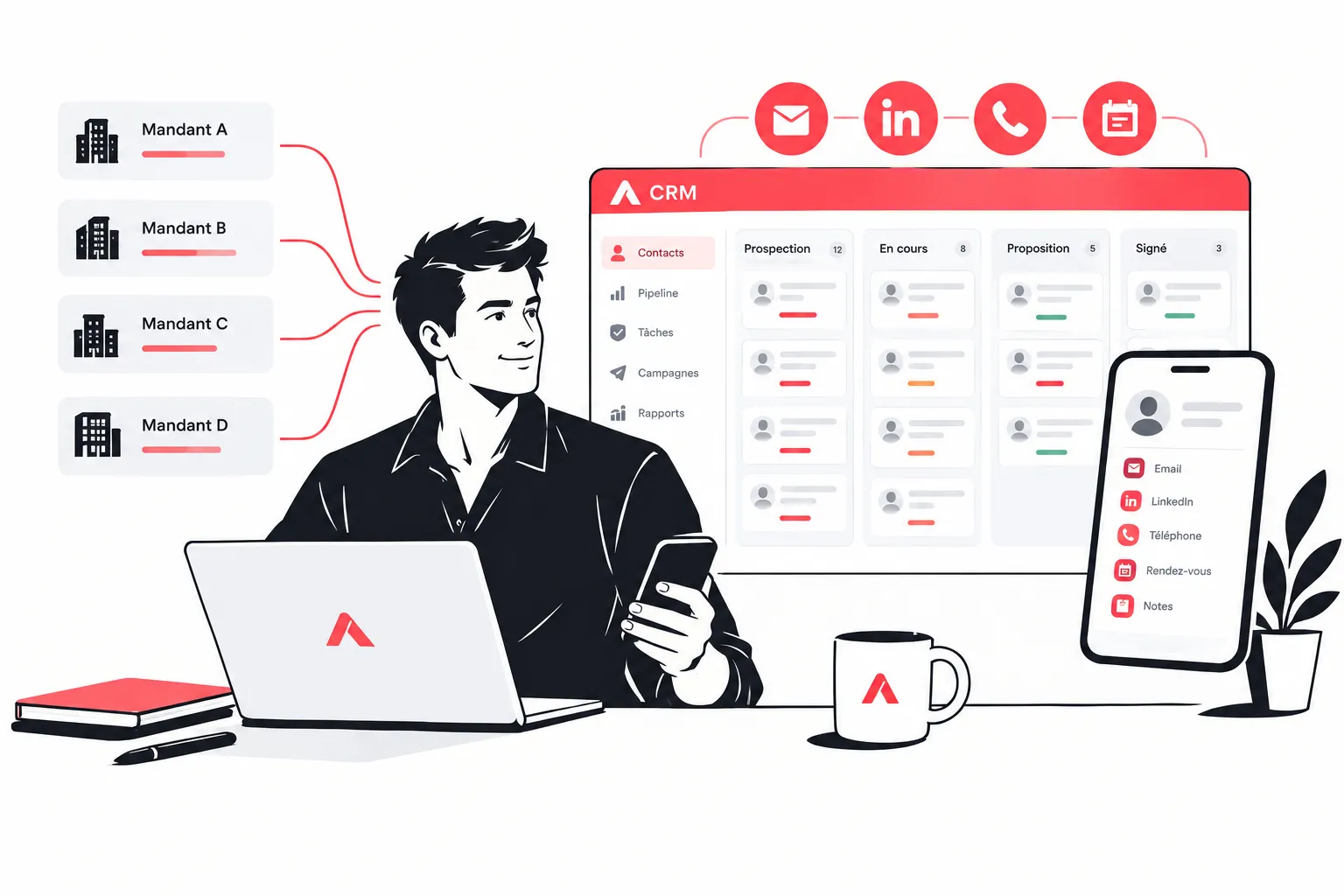
A CRM (Customer Relationship Management) is customer relationship management software. It allows you to centralize all interactions with your prospects and clients: exchange history, quote status, visit notes, scheduled follow-ups...For a sales agent, the challenge is specific. Unlike an employee working for a single company, an agent represents multiple principals simultaneously. They must therefore organize their portfolio by principal, track different products, and manage sales cycles that vary by product line.There are also several types of agents:
Independent multi-principal sales agents
VRP (traveling sales representatives) and field salespeople on the road
Freelancers and sales consultants
Agents who prospect through multi-channel (email, LinkedIn, phone)
A good sales CRM structures the entire sales process, from first contact to signature and even beyond, for customer follow-up and loyalty.
Why does a sales agent need a CRM?
The remark comes up often: "I have an Excel file, isn't that enough?" Our answer: no, not at all.Indeed, a sales agent manages on average between 50 and 300 active prospects per principal. Multiplied by the number of principals, that represents hundreds of contacts to track, each with their own stage in the buying cycle. Excel doesn't warn you when a follow-up is due and doesn't automatically match a prospect with the right principal's product. Moreover, Excel doesn't help you automate your prospecting sequences.Here's what a CRM concretely brings to a sales agent:
Centralized customer data: all information in one place, accessible from the field
Precise customer tracking: knowing exactly where each prospect stands in the sales funnel
Time savings: automating follow-ups, follow-up emails, task reminders
Organization by principal: segmenting your portfolio according to each sales representation
Complete history: finding the context of a past exchange in seconds before a call
In summary, CRM software allows sales agents to save time on administrative tasks to devote more to prospecting and selling.
What are the essential features of a CRM for sales agents?
1. Contact and company management
The basics: a complete prospect record with contact details, position, company, sector, and a space for free notes. The interface must allow you to find any contact in seconds.
2. Visual sales pipeline
A kanban board or pipeline view to see at a glance the status of all ongoing opportunities, by principal or by product family. Essential for prioritizing your actions.
3. Multi-channel prospecting sequences
Being able to schedule an email + LinkedIn + automated phone follow-up sequence, so you never forget to follow up with a hot prospect again. The best tools allow you to automate multiple channels without switching applications.
4. Reminders and tasks
An integrated reminder system so you never miss a follow-up. Field sales agents need a tool that syncs on mobile and sends contextualized alerts.
5. Quote and invoicing tracking
Some software goes further and integrates quote management and invoicing directly into the interface. Practical for agents who also handle the administrative side of their principals.
6. Activity reports by principal
To report to each principal on sales activity: number of prospects contacted, meetings held, quotes in progress. A dashboard per representation facilitates monthly reporting.
7. Data import/export
The ability to easily import prospect files (CSV, LinkedIn) and export your data remains an often-neglected feature, but it's essential to avoid getting stuck with a tool.
What are the different types of CRM?
There are several major families of CRM software. Understanding the differences helps you better target your needs.
Operational CRM
Focused on automating sales, marketing, and customer service processes. This is the most common type. It manages contacts, opportunities, follow-ups, and tasks. Ideal for field sales agents.
Analytical CRM
Oriented toward analyzing customer data to improve sales strategy. Useful for larger teams, less relevant for an independent agent primarily looking to optimize their daily activity.
Collaborative CRM
Designed to share information between multiple teams (sales, marketing, support). Interesting when a sales agent works in close synergy with a principal's marketing teams.
All-in-one prospecting CRM
The most recent category and often the most suited to independent sales agents. These tools combine contact management, multi-channel prospecting sequences (email + LinkedIn), and opportunity tracking in a single interface. No need to juggle between five different applications.
The best CRM software for a sales agent in 2026
Centra – The all-in-one tool for multi-channel prospecting
Centra stands out as the solution best suited to sales agents who prospect simultaneously on LinkedIn and by email. Where most customer relationship tools require juggling between an email sequencer, a LinkedIn extension, and a classic CRM, Centra unifies everything in a single interface.Strengths for sales agents:
LinkedIn + email prospecting sequences in a single workflow
Automatic enrichment of prospect data
Contact management by campaign or by principal
Clear interface and quick onboarding, without heavy training
Ideal for independent salespeople who regularly prospect new accounts
For an independent agent who must generate their own leads in addition to managing their existing portfolio, Centra is clearly the most effective choice.
Moovago – Specialized for field sales agents
Moovago is management software designed specifically for sales agents and traveling VRPs. It integrates route management, field visit tracking, and reporting by principal. A good choice for agents with many physical trips.
NoCRM.io– Simple and action-oriented
This CRM adopts a minimalist philosophy: focusing on actions to be performed rather than data entry. Well suited to independent salespeople who want to get to the essentials without superfluous features.
Folk – Relational solution with LinkedIn integration
Folk offers a "relational CRM" approach with native LinkedIn integration and personalized email sending features. A good compromise for agents who focus on long-term relationships rather than prospecting volume.
HubSpot – Powerful but oversized
HubSpot offers a very comprehensive free version. But for an independent sales agent, the tool can quickly become complex and advanced features quickly become paid. To consider especially if you work with a principal who already uses HubSpot.
Pipedrive – Visual sales pipeline
Pipedrive excels in sales pipeline visualization. Its intuitive interface makes it accessible to agents discovering CRM tools. However, multi-channel prospecting features remain limited outside of third-party integrations.
How to choose the right CRM for a sales agent?
Your prospecting method
Do you prospect mainly by cold email? By LinkedIn? By cold calling? By field visits? The dominant channel should guide your choice. A tool like Centra excels at LinkedIn + multi-sequence email prospecting. Moovago is more suited to field work.
The number of principals
If you represent a single principal, a simple tool suffices. If you have several, check that the solution allows you to segment your contacts and actions by principal, with distinct reports for each representation.
Ease of onboarding
Complex software that remains unused is worthless. Prefer an interface you can master in a few hours without training. Always test the trial version before committing.
Integrations with your existing tools
Email (Gmail, Outlook), LinkedIn, calendar, invoicing... check that the CRM integrates well with the tools you already use to avoid double entry and oversights.
Budget
Prices range from €0 (free HubSpot) to several tens of euros per month. For an independent sales agent, software between €20 and €50/month that saves you 3 hours per week is a largely profitable investment.
How much does a CRM for a sales agent cost?
Software prices for a single user vary according to features:
Free: HubSpot CRM (basic version), NoCRM (very limited version)
€10-25/month: entry-level, basic features, little automation
€25-60/month: the ideal range for a sales agent – good features, integrations, automated sequences
€60+/month: enterprise tools, often oversized for an independent
Most solutions offer a free trial of 14 to 30 days. Take advantage of it to test the tool on your own data before committing. The goal is for the software to earn you more time and revenue than its monthly cost.
What are the concrete benefits of a CRM for a sales agent?
Beyond features, here's what sales agents who use a CRM concretely observe in their daily activity.
More prospects contacted: automated sequences allow you to maintain a sustained prospecting pace without spending your evenings on it. An agent who manually sends 10 emails per day can send 50 with well-configured sequences.
Fewer lost opportunities: automatic reminders and structured customer tracking prevent the "I forgot to call them back" that loses deals.
Better reporting for principals: being able to present a precise dashboard of your activity strengthens credibility with principals and justifies the commission.
A more personalized customer relationship: with the complete history of each contact, every call or email can be contextualized, which significantly improves response rate and quality of exchanges.
Better daily organization: no more loose sheets, post-it notes, and desynchronized Excel files. All customer data is accessible from one place, on computer and mobile.
FAQ – CRM for sales agents
How to manage multiple principals in a single software without mixing everything up?
The most effective solution is to create distinct tags, lists, or pipelines per principal. You can then filter your view to display only prospects linked to a specific principal, and generate separate activity reports for each representation. Tools like Centra or Moovago allow this segmentation natively.
Should you get a CRM from the start of your sales agent activity?
As soon as you have two active principals or more than 30 prospects to track, switching to CRM software becomes profitable. Below that, a simple tracking file may suffice. But many agents wait too long and lose opportunities in the meantime – it's better to adopt good habits early.
How to improve your response rate when prospecting by email as a sales agent?
Three levers make the difference: personalization of the first message (mentioning the sector, a news item, a specific trigger), automatic follow-up at D+3 and D+7 (the majority of responses come after the 2nd or 3rd follow-up), and channel variety – combining email and LinkedIn significantly increases the contact rate. Sequencing tools like Centra allow you to configure all of this once and for all.
Can you use CRM software on mobile from the field?
Yes, most modern CRM software offers a mobile app or a responsive web interface. This is an important criterion if you do a lot of field work: being able to note a report right after a visit, consult a prospect's record before a meeting, or schedule a task from your phone saves considerable time.
What is the difference between a generalist CRM and a dedicated prospecting tool like Centra?
A generalist CRM (HubSpot, Salesforce, Pipedrive) is designed to manage customer relationships as a whole: pipeline, support, marketing. A prospecting tool like Centra is optimized for the upstream phase – generating contacts, engaging them on LinkedIn and by email, and qualifying them before they enter the pipeline. For a sales agent who must constantly feed their portfolio with new prospects, a tool dedicated to multi-channel prospecting is often more effective than a complete but underused CRM.
How to qualify a prospect before entering them into a sales follow-up sequence?
Qualification first goes through targeting: check that the prospect matches your principal's ideal profile (company size, sector, decision-maker's position, geographic area). Then, a short first contact – a LinkedIn message or an introductory email – validates interest before investing time in a long process. Modern tools allow you to automatically score prospects based on their interactions (email opens, clicks, replies) to prioritize follow-ups.